


Deploy active network monitoring across distributed nodes and visualize network performance from a single portal
All about nmaas
ActiveMon
ActiveMon enables organizations to deploy and manage active network monitoring tools on remote Kubernetes clusters directly from the nmaas portal. Technologies such as perfSONAR and Smokeping can be used to run distributed measurements of network performance, including throughput, latency, packet loss, jitter, round-trip time and path characteristics, close to the monitored infrastructure. nmaas simplifies the deployment and lifecycle management of these monitoring components across multiple locations, while central dashboards provide a unified view of measurement results. This helps operators assess connectivity, detect performance issues and maintain visibility over distributed network environments.
Everything
you need

Remote Cluster Onboarding
Easily connect remote Kubernetes clusters to a central nmaas instance and manage them as part of one distributed active monitoring infrastructure. Edge nodes, test locations, or measurement sites can be added with their specific configuration through a streamlined onboarding workflow, with built-in cluster health monitoring available directly in the platform.
Centralized Application Deployment
Deploy active monitoring applications on both central and remote clusters from a single nmaas portal. The platform hides the operational complexity of distributed Kubernetes environments, allowing users to select an application, choose the target location, configure deployment parameters, and launch monitoring components in a consistent way.

Extensible Monitoring Catalogue
Start with ready-to-use active monitoring components already available in the nmaas catalogue, including perfSONAR Testpoint, perfSONAR Archive and SmokePing. The catalogue can also be extended with additional applications supporting active measurements, enabling organizations to adapt the platform to their own monitoring workflows and technologies.

GitOps-based Configuration
Manage monitoring tool configuration using a GitOps-based workflow. Each deployed application instance is associated with a dedicated Git repository, allowing configuration changes to be versioned, reviewed, and pushed in a controlled and repeatable way across the distributed monitoring infrastructure.
Example
usage
perfSONAR deployment in EdgePL network
EdgePL – Pilot Deployment of an Edge Node System in Poland is a national initiative aimed at preparing, launching and testing a pilot network of 32 edge nodes. These nodes enable data processing close to end users, helping to ensure low latency and high quality of digital services.
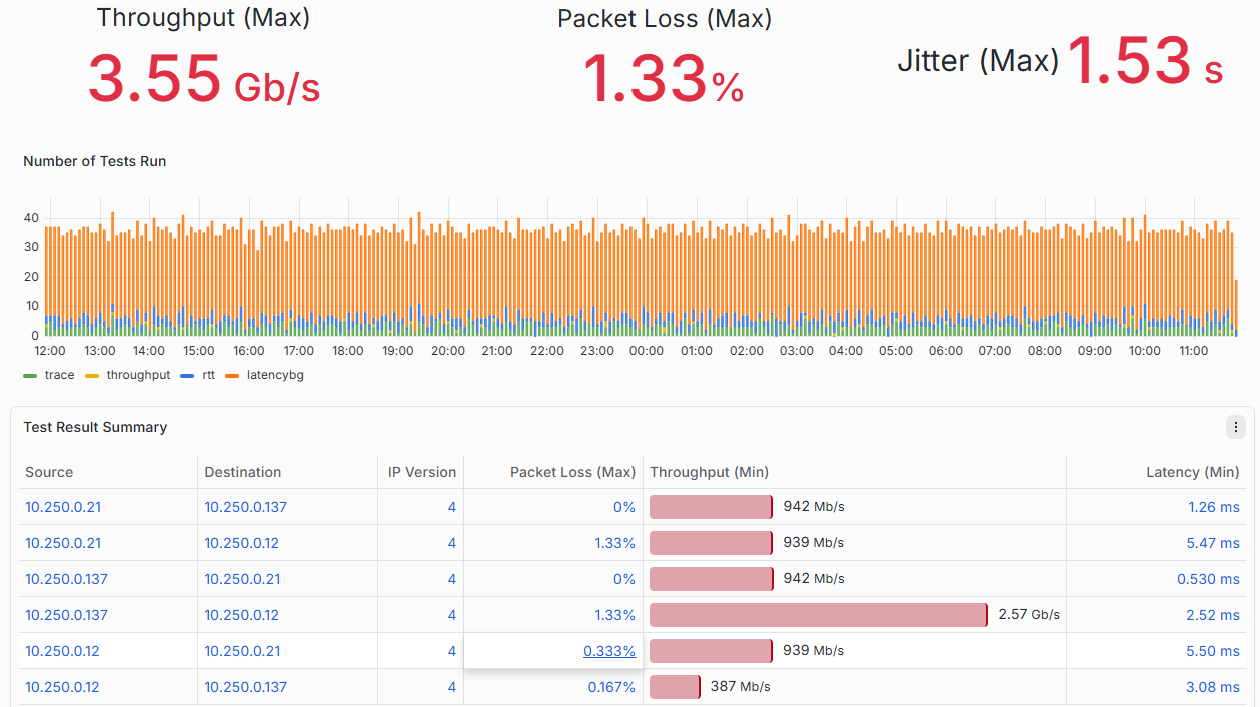
The initial deployment consists of perfSONAR Testpoint instances installed on three one-node Kubernetes clusters running on virtual machines distributed across different locations in Poland. These Testpoints monitor network performance between the distributed sites through scheduled active measurements. Measurement results are reported to a perfSONAR Archive deployed on the central nmaas management vNOC instance, where they are collected, stored and made available for visualization in Grafana. This setup provides a centrally managed view of connectivity and performance between geographically distributed infrastructure nodes.
Distributed active monitoring with nmaas in the RENATER network
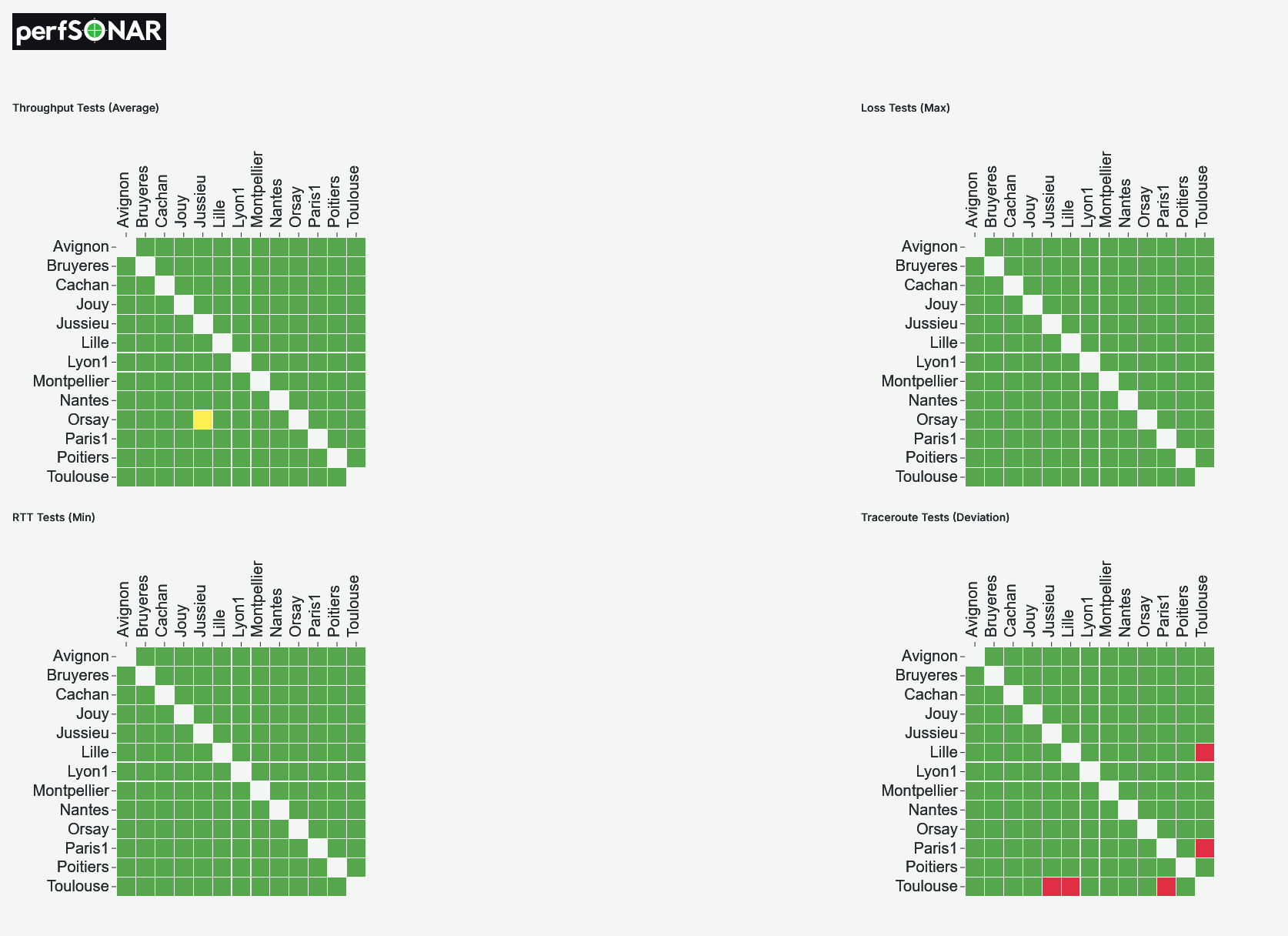
RENATER is the French National Research and Education Network, connecting universities and research institutions across the country. To monitor network performance at national scale, RENATER uses nmaas ActiveMon to orchestrate a distributed active monitoring infrastructure based on perfSONAR, with measurement nodes deployed at sites throughout France.
RENATER integrated nmaas with its internal automation stack to automate the rollout of perfSONAR nodes across remote Kubernetes clusters, while retaining full lifecycle control from a central nmaas instance deployed on premise. A key enabling feature is the nmaas webhook mechanism, used to trigger post-deployment automation, including updates to Maat, RENATER's authoritative single source of truth for application and service metadata, so that every deployed perfSONAR instance is immediately registered and tracked. For RENATER, the added value of nmaas includes efficient resource management, easy scaling of measurement points, convenient configuration changes, and automated software updates, offering a practical blueprint for similar initiatives across the NREN community.
How to get
started
?
Explore nmaas ActiveMon in your environment
To get started with nmaas ActiveMon, a deployment can be prepared on your existing infrastructure and adapted to your measurement and visualization requirements. This makes it possible to begin deploying monitoring components across your sites, building dashboards, and evaluating measurement workflows according to organizational needs.
Learn moreContact us through nmaas mailing lists

nmaas@lists.geant.org: If you want to reach the core nmaas team and discuss usage options, deployment scenarios, or for any general inquiry

nmaas-users@lists.geant.org: Discussions related to nmaas usage and development (subscribe here)

nmaas-announce@lists.geant.org: Announcements shared by the nmaas team with the community (subscribe here)
Explore
other
use cases
nmaas Virtual Lab is a cloud-based solution facilitating organization of hands-on exercises in the context of both formal, supervised, education (e.g., university courses), as well as for informal, and self-paced education (MOOCs, short demos, tutorials). nmaas Platform provides all the required functionalities and suitable portfolio of integrated applications to allow setting up online laboratories as effortlessly as possible from the educators' and learners' perspective.

nmaas Virtual NOC is a cloud-based, multi-tenant network management platform that simplifies network and service monitoring for organizations. It offers a suite of network management tools through a secure web portal and supports both managed and self-hosted instances. nmaas Virtual NOC helps organizations efficiently manage and monitor their networks without the need for setting up and maintaining in-house infrastructure.
nmaas Metrics is a flexible platform for collecting, consolidating, and visualizing data from multiple systems within a unified dashboard, enabling organizations to monitor project progress, track service KPIs and SLA compliance, analyze infrastructure performance, and measure user engagement in real time. By integrating data from source code repositories, CI/CD pipelines, monitoring systems, APIs, and other external services, it transforms distributed operational data into clear, actionable insights.